

decktalk install after the first line, for Chromium’s system libraries.
--no-spend buys no take and plays a
placeholder wherever a take is missing. Part 3 of this page adds your own voice, which is
the one thing in DeckTalk that costs money.
Part 1: install
1
Install the decktalk command
- One line
- uv
- pipx
uv tool install decktalk, and uv
brings its own Python. That is all it does. It never runs sudo, and it fetches neither
Chromium nor ffmpeg, because on Linux that download reaches apt-get through sudo and an
installer you piped into a shell has no business asking for a root password. Read the
script before you run it. That is why it is served from a
URL rather than hidden in a package.It finishes by naming the version it installed and the three commands to run next. Pipe it
into sh -s -- --dry-run to print what it would do and change nothing, and set
DECKTALK_VERSION to install one version rather than the latest.It runs on Linux and on macOS. On a musl system such as Alpine it stops and says why, because
Playwright, which records the slides, publishes no musl wheels. On Windows, use the uv tab.decktalk, add ~/.local/bin to your PATH and open a new shell. That
is where uv puts the command.2
Read the machine
decktalk doctor reports what is installed and what a run would use. This is what it prints on a
machine that has fetched its tools.... here.
API key elevenlabs ELEVENLABS_API_KEY missing means the key the narrator’s provider reads is
unset, which is the right state for everything up to part 3. KaTeX is not a download: the pinned
release ships inside the package, and DeckTalk serves it to the page.On a machine that has never recorded, the chromium, ffmpeg and ffprobe rows read
missing, and each one comes with a finding. doctor also prints Chromium is not installed. Run decktalk install to fetch it. above the table.decktalk install, so decktalk doctor --fix fetches what is absent. On a
terminal, doctor offers once to fetch it too. On macOS and Windows you never have to, because the
first command that needs a tool fetches it. On Linux, run decktalk install once first. It is the
one command that installs Chromium’s system libraries.Chromium and ffmpeg
DeckTalk drives headless Chromium to record the slides and ffmpeg to cut and encode them, and fetches both itself, one time per machine, the first time a command needs one.decktalk install makes both downloads up front instead, and does nothing else.
decktalk install is for says when it is worth
running, and what DeckTalk downloads gives the sizes and the
cache paths.
Part 2: build the starter film
1
Write the project
init asks for the name, the example and whether to write the skills. Pass
--no-input to take every default and ask nothing, which is what it does with no terminal
anyway. --example NAME writes a finished project to read rather than the starter to build on,
and --no-skills leaves the packaged skills out.The starter is three sections on one page, and none of it is a demo to delete first.
2
Build it without buying
Built is the line to read: the
film, what the run spent, and what the run found. Here that is one
TAKE_MISSING per section, because no section has a voiced
take yet and each plays a placeholder. Each is a warning, so the build still exits 0, and each
names the command that buys its take. Build times says how
long this build takes on a named machine that already has Chromium and ffmpeg. Recording is the
long part. It steps each section one frame at a time, with several recorders sharing the frames as
the machine’s CPU allows, so a longer film takes longer.The two middle lines are the run explaining itself. The starter declares no score, so that
stage has nothing to do. The loudness pass is skipped because normalising a placeholder to a
broadcast target would teach you nothing about the mix your voice will make.Run the same command again and it takes under a second. Nothing changed, so every stage keeps what
it made, and assemble and verify say so.If this machine has never run DeckTalk before, the download comes first and the run names it.3
Find the film
The film and everything that goes with it land in
build/final/.my-lesson.mp4 is the film. The name comes from [project] name in decktalk.toml. The
captions, the chapter marks, the transcript page and the poster frame are written from the same
words the film was cut against, so they cannot drift from it.- macOS
- Linux
- Windows
4
Ask what the project is holding
Take is the section’s take state:
voiced once a voice has spoken a take of its current text, voice and settings. A build that does
not spend writes a placeholder take instead, so it reads placeholder here while Recorded and
Assembled read yes. Stale is the column that matters after an edit: it marks a section whose
inputs have moved since the film was cut. status is a reading of the project rather than a third
opinion beside check and verify, and the one thing it judges is a file the project names and
has not got, which is a FILE_MISSING error.Before the first build the same table reads missing under Take and no in every other column,
and a Next line under it reads decktalk narrate --no-spend. Once the film on disk is the one
the last build measured, there is nothing next, so the line is gone.What the starter shows
Three sections on one page, one scene each, every slide written as markup inside a<template data-slide> element. There is no JavaScript in it to read.
Open
deck/index.html under the origin decktalk serve prints, such as
http://127.0.0.1:65298/deck/index.html, for the scene index, which lists every scene and every
slide with the cues it declares.
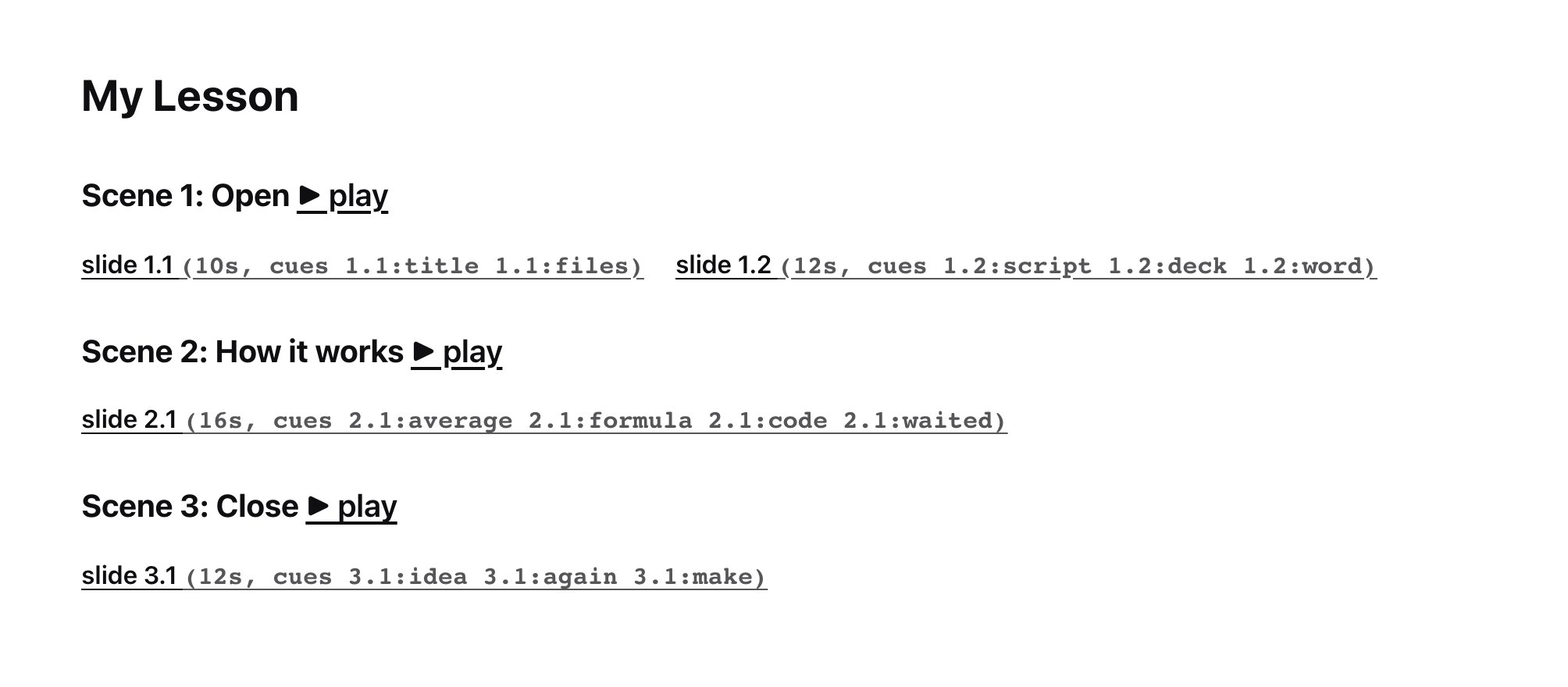
The starter's scene index, with every slide and the cue ids it declares.
serve answers from the project directory on 127.0.0.1, which is the origin the recorder uses, so
what the browser shows is what the recorder sees. The port is any free one unless --port names
one. Press Ctrl-C to stop it.
The equation in scene 2 is where the starter shows its one trap. data-tex holds the TeX and the
element’s own text is the fallback that shows if KaTeX ever fails to load, so the fallback is written
to read correctly out loud rather than left as raw TeX.
Part 3: add your own voice
A voiced build sends each section’s text to ElevenLabs and gets speech back, and that is the only part of DeckTalk that costs money. Stop here if you have no account: the film you built is a complete film.1
Put the key in .env and the voice in decktalk.toml
- macOS and Linux
- Windows
= in place of <your-elevenlabs-key>, and write the id of the voice that reads the script as
[voices.narrator] id in decktalk.toml..env
decktalk.toml
.env or from the environment reaches a --json payload, a log
line or an error message. The voice id is a published name rather than a secret, so it is
committed with the project. It says which voice to speak in and grants nothing, since a cloned
voice is usable only with its own account’s key, and it is part of what names a take, so changing
it voices every section again. DECKTALK_VOICES_NARRATOR_ID in the environment overrides it for anyone who
keeps it out of the file.A value that still starts with < counts as unset, so the example file as it ships approves
nothing. A variable already in the environment wins over the file. The starter’s .gitignore
already covers .env, and keeps .env.example.2
Price the run before you make it
decktalk check judges the written files and the pages and prices the narration a voiced build
would buy. It calls no API and writes nothing a stage reads, so it is the one call to make when
you want the price of the voice. A project with a score prices its sound with
decktalk score --no-spend.run, written, judged, pages_opened, frames_compared,
cost and storyboard beside the four keys every result reserves. Its cost is the price:dollars is the price at your rate, and ceiling_dollars is the most the run can reach.
ElevenLabs declares that it bills per character, so the rate is the key price_key names,
[elevenlabs] dollars_per_1000_characters in your own decktalk.toml, and the figure is your
plan’s and not an invention. How the price is worked out
gives every field and says why the two dollar figures can differ.3
Look at what you are about to buy
build/storyboard.html and read the film as stills, because a slide you fix here
costs nothing and a slide you fix after a voiced build costs that section again. --section,
--slide, --after, --before and --at narrow the sheet.4
Build with your voice
--spend approves the spend. --max-cost N refuses the whole run before the first paid call
when the most it can cost is over N US dollars, and the refusal names the figure that would let
it through. It approves nothing on its own: it is a ceiling on the spend --spend approves. A
ceiling of five cents on this project reads:decktalk build with neither flag prints the price and asks. Answer no and the
run goes on as --no-spend would, with a placeholder wherever a take is missing and silence where
a sound is unbought. With no terminal there is nobody to ask, so it refuses rather than guessing,
and the refusal carries the price, so one call prices the run.Next
- Write a section of your own: Your first deck
- Start from a finished project: Examples
- Know what a machine needs and what it costs: Requirements and costs
- Make the script time well: Writing for the ear
- Rebuild only what changed: Rebuild one section